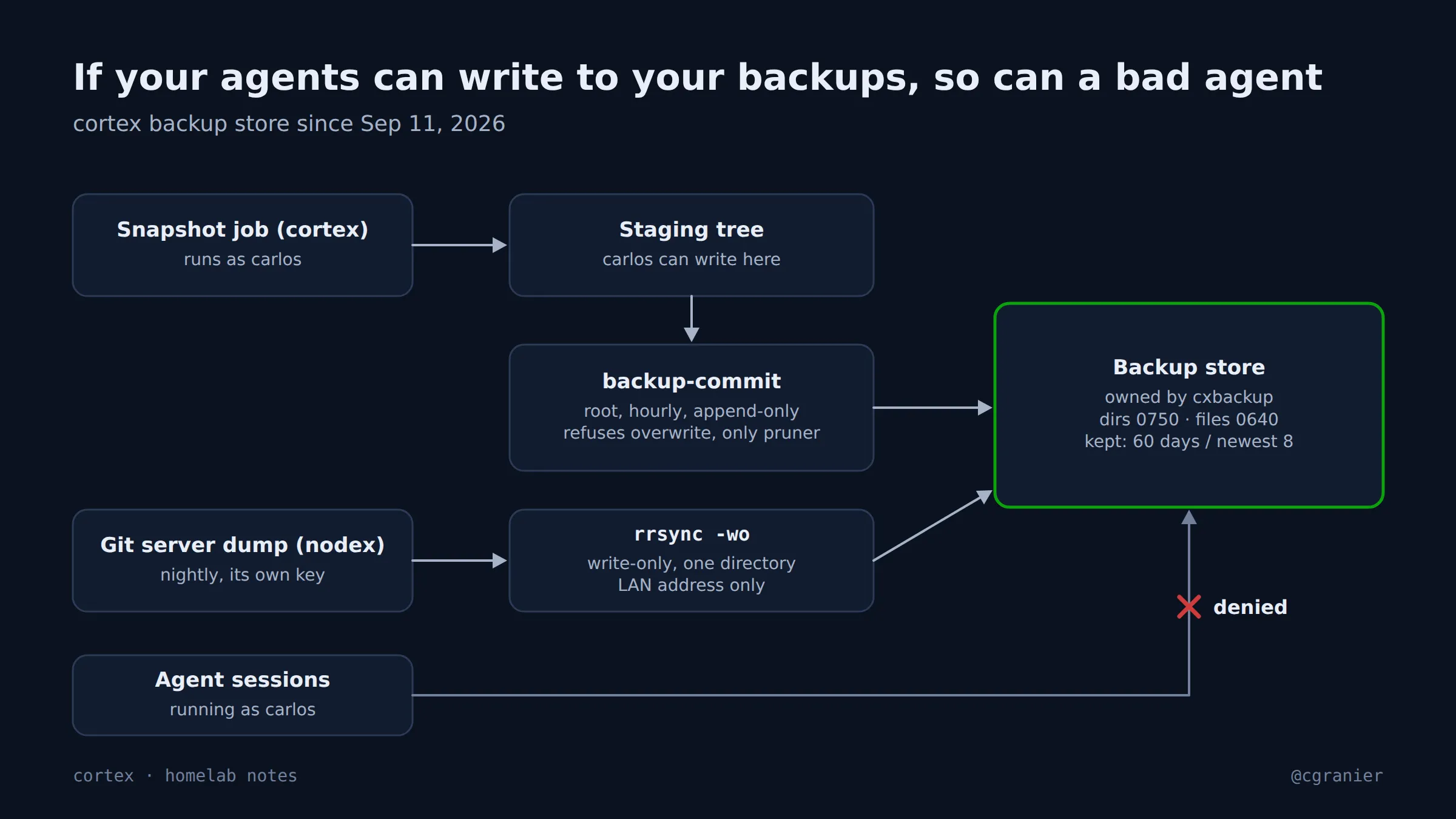
The short version: my backup store was writable by every process that runs as me, which includes the AI agents I run all day. A bad agent run could have damaged the copies meant to survive a bad agent run. Now a separate user owns the store, and one root job is the only thing that moves files in or prunes them.
Get the week's seven in one email, every Monday.
What went wrong
My server keeps backups on a RAID: nightly dumps of my git server, and weekly snapshots of another machine’s agent workspace. Everything landed there as my own user.
When I listed every place my agents could write, the backup folder was on it. My coding agents run as me, so they could overwrite or delete the very copies I’d need if one of them went wrong. And the git server’s nightly job delivered its dump with my own interactive SSH key, then ran a remote find … -delete on the backup host: a full shell as me from another machine, every night.
What we learned
- If agents run as your user, anything your user can write, they can write. Backups need an owner the agents aren’t.
- The job that deletes old backups is the most dangerous part of a backup system. It should be one thing, owned by root, and nothing else should be able to delete.
- Least privilege applies to the job, not the person. My own key stays mine; the backup job gets its own, restricted one.
What went right
The inventory that found this was cheap: an afternoon listing every path an agent session could write. It found other problems the same day.
How to do it (as of October 2026)
- Create a separate system user to own the backup store, with folders at
0750and files at0640. - Let producers write only to a staging folder. A root-run job moves finished files into the store every hour: append-only, refusing to overwrite, and the only thing that prunes (60 days of git dumps, the newest 8 snapshots).
- Give each remote producer its own key, restricted to write-only into one folder (
rrsync -wo), and point it at the backup host’s LAN address. If you use Tailscale SSH, per-key restrictions don’t apply on the tailnet address. - Use
rsync -rt, notrsync -a:-acopies the source’s permissions onto the store. My first run set a folder to775; the hourly job now re-asserts permissions every time. - Test that your own user is refused:
toucha file in the store and expect “Permission denied”.
Status
Fixed on September 11, 2026, and checked the next morning: the night’s dump arrived owned by the backup user, with no errors.