Most AI demos look impressive because they run on idealized hardware: a dedicated GPU, a clean cloud API, and a carefully scripted input. Real-world AI deployments almost never look like that. In the field—whether on a hospital workstation, a factory kiosk, a retail terminal, or an existing fleet of aging laptops—you inherit hard constraints: no GPU, tight thermal budgets, idiosyncratic operating systems, and users who will abandon a tool the second it misfires twice in a row.
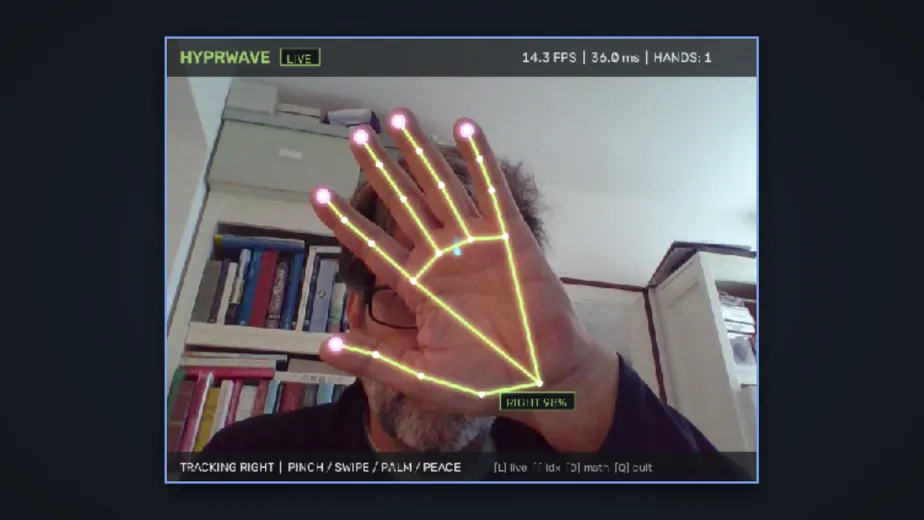
To pressure-test those constraints end to end, I built HyprWave: a 100% local, real-time hand-gesture controller with a live HUD overlay that drives window management, audio, brightness, and media playback on a 9-year-old fanless Google Pixelbook (Intel Core i7-7Y75, 2 physical cores, 4.5W TDP, no NPU, no discrete GPU) running Omarchy Linux and Hyprland (pure Wayland).
The project itself is fun—you can fold the Pixelbook into tent mode and control it from across the desk—but the real lesson is one every Forward Deployed Engineer and AI Implementation Consultant learns fast:
Getting a model to run is the first 20% of the job. The other 80% is hardware budgeting, runtime debugging, signal conditioning, and safety guardrails.
1. Starting From Constraints, Not Model Hype
Before writing a line of Python, I audited the target hardware and OS boundary:
| Constraint | Measured Reality | Engineering Implication |
|---|---|---|
| Compute & Thermals | Dual-core 7th-gen i7-7Y75, fanless chassis | Continuous 30 FPS 720p inference causes thermal throttling; must cap resolution, frame rate, and idle duty cycle |
Sensor (v4l2-ctl) | Native 640×480 uncompressed YUYV @ 30 FPS vs. 1280×720 MJPG @ 30 FPS | Capture 640×480 YUYV to eliminate JPEG decode overhead—hand-landmark models downscale internally anyway |
| Runtime Environment | Rolling Arch/Omarchy (Python 3.14), pure Wayland (Hyprland) | Isolate a Python 3.12 environment via uv for MediaPipe binary wheels; avoid X11-only GUI assumptions |
| Privacy & Latency | Zero cloud round-trips; local real-time control | Run MediaPipe HandLandmarker locally on CPU (XNNPACK) in RunningMode.VIDEO |
Choosing RunningMode.VIDEO over IMAGE mode was a deliberate architectural trade-off: instead of running full-frame palm detection on every frame, MediaPipe tracks the previous hand bounding box frame-to-frame. Combined with a 20 FPS frame cap, inference settled at ~36–43 ms per frame (~14–17 FPS active) on two 2017 mobile CPU cores—zero cloud cost, zero network dependency, and no GPU required.
2. System Architecture: Decoupling Perception From Action
A common failure mode in prototype ML apps is tangling camera I/O, model inference, gesture heuristics, UI rendering, and side-effecting system calls in a single while True loop. That makes failures impossible to isolate and live demos nerve-wracking.
HyprWave separates the pipeline into five explicit boundaries:
Why this separation pays off immediately:
- Observability is built in: Pressing
dtoggles a live math telemetry card (palm_size,pinch_ratio, finger states, horizontal velocityvx) directly over the video feed, turning “why didn’t that swipe register?” from guesswork into measurable inspection. - Safe rollouts (
DEMOvs.LIVE): The action layer defaults todry_run=True. You can validate perception and state transitions visually before pressinglto arm live desktop control.
3. Production Debugging: Three Real Failures You Won’t See in Tutorials
In client deployments, things rarely fail cleanly with a helpful stack trace. Three real integration issues surfaced on this machine—each solved through systematic isolation rather than trial-and-error guesswork:
Failure 1: Silent SIGABRT on Pure Wayland (cv2.imshow)
PyPI’s OpenCV wheels bundle Qt5 with only the X11 (xcb) platform plugin. On a pure-Wayland Hyprland session, cv2.namedWindow() aborts immediately. Worse, importing cv2 (pulled in transitively by MediaPipe) silently mutates QT_QPA_PLATFORM_PLUGIN_PATH to point at OpenCV’s Qt5 directory—breaking Qt6 windows in the same process.
Resolution: Replaced cv2.imshow() with a native PyQt6 Wayland window (window.py) that sanitizes OpenCV’s QT_QPA_* overrides before initializing QApplication, gaining HiDPI scaling on the Pixelbook’s 2400×1600 display and a non-blocking QTimer event loop.
Failure 2: Unexplained SIGKILL (exit 137) Inside MediaPipe LiteRT
Even with Delegate.CPU explicitly set, launching HyprWave on the host session died silently right after XNNPACK CPU accelerator registered. with exit 137 (SIGKILL)—no Python traceback, no OOM entry in journalctl, while the exact same code passed inside a headless container.
Diagnosis: Rather than guessing, I ran a 4-case subprocess bisect varying GPU ICDs (VK_ICD_FILENAMES, LITERT_DISABLE_OPENCL) and desktop session variables (DISPLAY, WAYLAND_DISPLAY, XDG_RUNTIME_DIR, DBUS_SESSION_BUS_ADDRESS). Dropping GPU ICDs alone still killed the process; dropping both X11 and Wayland session variables immediately produced exit 0. That isolated the root cause to libmediapipe.so probing Wayland/X11 EGL displays on Intel HD 615 during HandLandmarker.create_from_options().
Resolution: Wrapped MediaPipe initialization in a narrow _headless_env() context manager that hides display/session variables strictly during create_from_options() and immediately restores them before PyQt6 opens on native Wayland.
Failure 3: Real-World Input Doesn’t Match Lab Assumptions
In unit tests, swipes worked on the first try. On live video at 17 FPS, they felt spotty—and worked noticeably better when the whole forearm was visible. Inspecting the live telemetry exposed three physical causes:
- Fast swipes introduced 1–2 frames of webcam motion blur, causing empty detections that immediately wiped the trajectory buffer.
- Tracking the wrist (
landmark #0) degraded whenever the forearm dipped below the 4:3 frame edge. - Comparing only against the oldest sample in a short window penalized swipes accelerating from rest.
Resolution: Switched the swipe anchor to the 4-knuckle centroid (#5, #9, #13, #17), lowered min_tracking_confidence to 0.35 so MediaPipe retains lock through blur, added a 0.30s hand-lost grace window, and scanned all recent segments inside a 0.45s rolling buffer. Swipe reliability went from hit-or-miss to consistent immediately.
4. Turning Noisy Model Output Into Trustworthy UX
Raw ML predictions jitter. Shipping an AI interface that users trust requires deterministic signal processing and explicit guardrails on top of the model:
- Scale invariance & aspect correction: All distances are aspect-corrected (
dx * 640/480) and normalized by palm length (dist(wrist #0, middle MCP #9)), so thresholds hold whether the user is 1 foot or 4 feet from the camera. - Hysteresis (Schmitt trigger) on analog controls: Pinch enters below
0.36palm-lengths and exits above0.52, eliminating rapid on/off chatter at the boundary. An Exponential Moving Average (alpha = 0.35) smooths relative vertical drag into a steady slider. - Edge-triggered hold timers & cooldowns: Discrete actions (Play/Pause via Open Palm, Mute via Peace Sign) require a steady
0.60shold—visualized as a filling progress arc—and lock until released. Swipes enforce a0.70scooldown so returning your hand to rest never fires a reverse action. - Operational safety guardrails:
- Brightness IPC is hard-clamped at
>= 5%so a pinch gesture can never black out the screen. - Slider IPC (
wpctl,brightnessctl) is non-blocking (subprocess.Popen) and rate-limited (80 ms+>= 2%delta) so OS calls never stall frame rendering or flood PipeWire. - Adaptive idle throttling drops the render/inference timer from 20 FPS → 4 FPS after
2.5swith no hand in frame (~80% less idle compute on a fanless chassis), waking instantaneously on hand entry. - Clean
SIGTERMhandling + a single Hyprland binding (Super + Shift + H) and pinned floating PiP window rule let the user summon or dismiss the tool cleanly—guaranteeing/dev/video0and the camera LED release immediately.
- Brightness IPC is hard-clamped at
5. Measured Results
| Metric | Result on 2017 Pixelbook (i7-7Y75, CPU-only) |
|---|---|
| Active Tracking Rate | ~14–17 FPS (36–43 ms inference/frame via XNNPACK) |
| Idle Duty Cycle | Auto-throttles to 4 FPS after 2.5s (~80% idle compute cut) |
| Cloud / API Cost | $0 (100% local, zero video leaves the device) |
| Hardware Requirement | Standard UVC webcam + 9-year-old dual-core CPU |
| Control Surface | Workspace switching, volume, brightness, play/pause, mute |
Why This Matters Beyond a Laptop Demo
You can swap “Hyprland workspace control on a Pixelbook” for almost any constrained operational environment and the engineering playbook stays identical:
- Cleanrooms, clinics, kitchens, and shop floors: Touchless control over existing terminals without replacing hardware or streaming video to the cloud.
- Edge-first AI economics: Auditing sensor formats, capping frame rates, and duty-cycling idle inference often eliminates the need for expensive GPU upgrades.
- Reliability as a systems problem: Users don’t care which neural architecture you picked; they care whether the system fails safely, recovers from noisy real-world inputs, and integrates seamlessly into the tools they already use.
Built on Omarchy Linux / Hyprland with Python 3.12 (uv), MediaPipe Tasks, OpenCV, and PyQt6. Want to run it yourself or dig into the implementation details? The full source code and step-by-step build walkthrough (docs/tutorial.md) are available on GitHub.
If your team is navigating the gap between an AI prototype and a reliable production deployment—especially under real-world hardware, privacy, or workflow constraints—let’s talk.
New posts by email
New posts and case studies, sent when they're published. Unsubscribe anytime.
About the Author
Carlos Granier is a Tech Founder, CTO, and AI Strategist with 25 years of experience building at the intersection of technology and business. He co-founded Pongalo, one of the first US Hispanic OTT platforms, and built a YouTube MCN to 200M+ monthly views. He now helps founders and executives implement AI as practical infrastructure. Based in Miami, Florida.
Let's Connect
If you want to work together , or just say hi, email me at blog-inbound@cgranier.com or reach out on any of these:
- X (Twitter) /
- Threads /
- Instagram /
- GitHub /